Imagine running an entire business without owning a single server. That’s the magic of cloud computing—flexible, scalable, and revolutionizing how we store, access, and manage data in real time.

What Is Cloud Computing and How Does It Work?

Cloud computing refers to the delivery of computing services—including servers, storage, databases, networking, software, analytics, and intelligence—over the internet (“the cloud”). Instead of owning physical data centers or servers, businesses rent access to technology services from cloud providers on a pay-as-you-go basis.
Core Components of Cloud Infrastructure
The backbone of cloud computing lies in its infrastructure, which includes virtualized hardware, distributed networks, and centralized management systems. These components work together to deliver seamless, on-demand computing power.
- Virtualization: Enables multiple virtual machines (VMs) to run on a single physical server, maximizing resource utilization.
- Storage Systems: Data is stored across redundant systems, ensuring durability and availability even during hardware failures.
- Networking: High-speed, secure connections link users to cloud resources, often using Content Delivery Networks (CDNs) for faster access.
How Cloud Computing Differs from Traditional IT
Traditional IT requires companies to purchase, maintain, and upgrade physical servers and software licenses. This model is capital-intensive and inflexible. In contrast, cloud computing shifts the burden of infrastructure management to the provider.
“The cloud is not about replacing your IT department; it’s about transforming it.” — Satya Nadella, CEO of Microsoft
With cloud computing, organizations can scale up or down instantly, pay only for what they use, and access cutting-edge technologies like AI and machine learning without heavy upfront investment.
The 3 Main Types of Cloud Computing Services
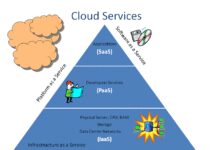
Cloud computing is typically categorized into three service models: Infrastructure as a Service (IaaS), Platform as a Service (PaaS), and Software as a Service (SaaS). Each offers different levels of control, flexibility, and management.
Infrastructure as a Service (IaaS)
IaaS provides the most control over computing resources. It offers virtualized computing over the internet, including virtual machines, storage, and networks. Users manage operating systems, applications, and data, while the provider handles the physical hardware.
- Examples: Amazon Web Services (AWS) EC2, Microsoft Azure Virtual Machines, Google Compute Engine.
- Best for: Enterprises needing full control over their environment, such as DevOps teams or large-scale applications.
Learn more about IaaS from AWS’s official guide.
Platform as a Service (PaaS)
PaaS provides a platform allowing customers to develop, run, and manage applications without dealing with the underlying infrastructure. It includes development tools, database management systems, and middleware.
- Examples: Google App Engine, Microsoft Azure App Services, Heroku.
- Best for: Developers who want to focus on coding without worrying about server maintenance or scaling.
PaaS accelerates development cycles and supports collaborative workflows, making it ideal for agile teams.
Software as a Service (SaaS)
SaaS delivers software applications over the internet on a subscription basis. The provider manages everything—from infrastructure to updates—so users can access the software via a web browser.
- Examples: Google Workspace, Microsoft 365, Salesforce, Zoom.
- Best for: Businesses looking for ready-to-use applications with minimal setup and maintenance.
SaaS has become the dominant model for business software due to its ease of deployment and automatic updates.
Public, Private, and Hybrid Cloud Models Explained
Organizations can deploy cloud computing in different environments based on their security, compliance, and operational needs. The three primary deployment models are public, private, and hybrid clouds.
Public Cloud
In a public cloud, computing resources are owned and operated by third-party cloud service providers and delivered over the public internet. These resources are shared among multiple organizations (tenants).
- Providers: AWS, Microsoft Azure, Google Cloud Platform.
- Advantages: Cost-effective, highly scalable, no maintenance overhead.
- Challenges: Limited control, potential security concerns for sensitive data.
Public clouds are ideal for startups, web applications, and services with variable workloads.
Private Cloud
A private cloud is dedicated to a single organization. It can be hosted on-premises or by a third-party provider but remains isolated from other customers.
- Use Cases: Government agencies, financial institutions, healthcare providers with strict regulatory requirements.
- Benefits: Enhanced security, greater control, customizable infrastructure.
- Drawbacks: Higher costs, requires in-house expertise to manage.
Private clouds offer the benefits of cloud computing—like scalability and automation—while maintaining control over data and compliance.
Hybrid Cloud
The hybrid cloud combines public and private clouds, allowing data and applications to be shared between them. This model offers greater flexibility and deployment options.
- Example: A company runs sensitive customer data on a private cloud while using a public cloud for customer-facing web applications.
- Benefits: Optimized costs, improved disaster recovery, workload portability.
- Challenges: Complexity in integration and management.
According to a study by IBM, over 70% of enterprises now use a hybrid cloud strategy to balance performance, security, and cost.
Top 7 Benefits of Cloud Computing for Businesses
Cloud computing is more than just a trend—it’s a strategic enabler for innovation, efficiency, and growth. Here are seven powerful advantages driving its adoption across industries.
1. Cost Efficiency and Reduced Capital Expenditure
One of the most compelling reasons to adopt cloud computing is cost savings. Instead of investing millions in data centers and hardware, businesses pay only for the resources they consume.
- No upfront hardware costs.
- Pay-as-you-go pricing models eliminate waste.
- Lower energy and cooling expenses.
This shift from capital expenditure (CapEx) to operational expenditure (OpEx) makes technology accessible even to small businesses.
2. Scalability and Elasticity
Cloud computing allows businesses to scale resources up or down instantly based on demand. Whether handling a sudden traffic spike or seasonal fluctuations, the cloud adapts automatically.
- Auto-scaling features adjust capacity in real time.
- Supports rapid growth without infrastructure delays.
- Ideal for e-commerce, media streaming, and SaaS platforms.
For example, Netflix relies on AWS to handle millions of concurrent streams during peak hours.
3. Business Continuity and Disaster Recovery
Data loss can be catastrophic. Cloud computing enhances resilience through automated backups, redundancy, and geographically distributed data centers.
- Automatic snapshots and replication ensure data integrity.
- Disaster recovery plans can be tested and executed quickly.
- Minimizes downtime and data loss during outages or cyberattacks.
Many cloud providers offer built-in tools like AWS Backup and Azure Site Recovery.
4. Global Accessibility and Remote Work Enablement
With cloud computing, employees can access files, applications, and systems from anywhere with an internet connection. This has been crucial in the rise of remote and hybrid work models.
- Enables collaboration across time zones.
- Supports mobile workforce with secure access.
- Integrates with collaboration tools like Slack, Teams, and Google Meet.
During the pandemic, organizations using cloud-based tools adapted faster to remote operations.
5. Faster Innovation and Time-to-Market
Cloud platforms provide developers with pre-built tools, APIs, and managed services that accelerate application development.
- DevOps pipelines can be automated using CI/CD tools.
- Access to AI, machine learning, and big data analytics without building from scratch.
- Prototypes can be deployed in hours, not weeks.
Startups like Airbnb and Uber leveraged the cloud to launch and scale rapidly.
6. Enhanced Security and Compliance
Contrary to popular belief, cloud computing often provides better security than on-premises systems. Major providers invest billions in cybersecurity and compliance certifications.
- Advanced threat detection and encryption at rest and in transit.
- Compliance with standards like GDPR, HIPAA, SOC 2, and ISO 27001.
- Regular security audits and penetration testing.
For instance, Google Cloud uses zero-trust security models to protect data.
7. Environmental Sustainability
Cloud data centers are more energy-efficient than traditional on-premises servers. Providers optimize cooling, power usage, and server utilization to reduce carbon footprints.
- Shared infrastructure reduces redundant hardware.
- Renewable energy powers many cloud regions (e.g., AWS aims for 100% renewable energy by 2025).
- Lower e-waste due to centralized management.
Adopting cloud computing aligns with corporate sustainability goals and ESG initiatives.
Common Challenges and Risks in Cloud Computing
Despite its advantages, cloud computing is not without challenges. Organizations must navigate technical, financial, and security risks to maximize benefits.
Data Security and Privacy Concerns
Storing sensitive data off-premises raises concerns about unauthorized access, data breaches, and compliance violations.
- Risk of misconfigured cloud storage (e.g., public S3 buckets).
- Shared responsibility model: Users must secure their data and access controls.
- Need for encryption, multi-factor authentication (MFA), and identity management.
A 2023 report by McAfee found that 65% of cloud breaches were due to misconfigurations.
Vendor Lock-In and Portability Issues
Once an organization builds its ecosystem on a specific cloud platform, migrating to another can be complex and costly.
- Proprietary APIs and services make interoperability difficult.
- Data egress fees can discourage switching providers.
- Solution: Use open standards and containerization (e.g., Kubernetes) for portability.
Adopting a multi-cloud strategy can reduce dependency on a single vendor.
Performance and Latency Issues
While the cloud offers high availability, performance can vary based on network conditions, geographic location, and resource contention.
- Latency-sensitive applications (e.g., real-time trading) may require edge computing.
- Bandwidth limitations can affect large data transfers.
- Monitoring tools like CloudWatch (AWS) or Azure Monitor help identify bottlenecks.
Choosing the right region and using CDN services can mitigate latency.
Emerging Trends Shaping the Future of Cloud Computing
The cloud landscape is evolving rapidly, driven by innovation in AI, edge computing, and automation. Staying ahead of these trends is crucial for long-term success.
Edge Computing and the Decentralization of Data
Edge computing brings data processing closer to the source—like IoT devices or sensors—reducing latency and bandwidth usage.
- Used in autonomous vehicles, smart cities, and industrial automation.
- Complements cloud computing by preprocessing data before sending it to the cloud.
- Providers: AWS Wavelength, Azure Edge Zones, Google Distributed Cloud.
According to Gartner, by 2025, 75% of enterprise data will be processed at the edge, up from 10% in 2018.
Serverless Architecture and Function-as-a-Service (FaaS)
Serverless computing allows developers to run code without provisioning or managing servers. You pay only when the function executes.
- Examples: AWS Lambda, Azure Functions, Google Cloud Functions.
- Benefits: Zero server management, automatic scaling, cost efficiency for sporadic workloads.
- Use Cases: Image processing, chatbots, real-time data transformation.
Serverless is transforming how applications are built, enabling event-driven architectures.
AI and Machine Learning Integration in the Cloud
Cloud providers now offer managed AI/ML services that make advanced analytics accessible to non-experts.
- Tools: Amazon SageMaker, Google Vertex AI, Azure Machine Learning.
- Capabilities: Natural language processing, computer vision, predictive analytics.
- Democratizes AI for small businesses and startups.
These services reduce the barrier to entry for building intelligent applications.
How to Choose the Right Cloud Provider for Your Needs
Selecting a cloud provider is a strategic decision that impacts performance, cost, and scalability. Consider these factors before making a choice.
Evaluating Key Features and Service Offerings
Not all cloud providers are created equal. Compare their core services, global reach, and specialized tools.
- Compute options: Virtual machines, containers, serverless.
- Storage types: Object, block, file, archival.
- Networking: VPCs, load balancers, CDN integration.
- Specialized services: AI, IoT, blockchain, quantum computing.
For example, AWS leads in breadth of services, while Google Cloud excels in data analytics and AI.
Assessing Pricing Models and Cost Management
Understanding pricing is critical to avoid unexpected bills. Most providers offer calculators and cost estimation tools.
- Compare pay-as-you-go, reserved instances, and spot pricing.
- Monitor usage with cost management dashboards.
- Look for free tiers and credits for startups.
AWS Pricing Calculator, Azure Pricing Calculator, and Google Cloud Pricing Calculator are essential tools for budgeting.
Considering Security, Compliance, and Support
Ensure the provider meets your industry’s regulatory requirements and offers robust support.
- Check compliance certifications (GDPR, HIPAA, etc.).
- Review SLAs (Service Level Agreements) for uptime and support response times.
- Evaluate customer support options: 24/7, dedicated account managers, community forums.
For regulated industries, choose providers with strong audit trails and encryption standards.
Real-World Applications of Cloud Computing Across Industries
Cloud computing is not just for tech companies. It’s transforming healthcare, finance, education, retail, and more.
Healthcare: Secure Data Sharing and Telemedicine
Hospitals and clinics use cloud computing to store electronic health records (EHRs), enable telehealth platforms, and analyze medical imaging.
- Google Cloud Healthcare API supports HIPAA-compliant data processing.
- Cloud-based AI assists in diagnosing diseases from X-rays and MRIs.
- Telemedicine apps like Teladoc rely on cloud infrastructure for scalability.
The cloud enables faster, more personalized care while maintaining data privacy.
Finance: Fraud Detection and Digital Banking
Banks and fintech companies use the cloud for real-time transaction monitoring, risk analysis, and customer-facing apps.
- Machine learning models detect fraudulent transactions in milliseconds.
- Cloud-based core banking systems support digital wallets and mobile payments.
- Regulatory reporting is automated using cloud analytics.
JPMorgan Chase and Capital One have migrated significant workloads to AWS for agility and innovation.
Education: E-Learning Platforms and Virtual Classrooms
Schools and universities use cloud computing to deliver online courses, manage student data, and host virtual classrooms.
- Google Classroom and Microsoft Teams for Education run on cloud infrastructure.
- Scalable video conferencing supports thousands of students simultaneously.
- AI-powered tutoring systems personalize learning experiences.
The pandemic accelerated cloud adoption in education, making remote learning more accessible.
Getting Started with Cloud Computing: A Step-by-Step Guide
Ready to move to the cloud? Follow this structured approach to ensure a smooth transition.
Step 1: Assess Your Current IT Infrastructure
Begin by auditing your existing systems, applications, and data. Identify which workloads are suitable for the cloud.
- Map dependencies between applications and databases.
- Evaluate performance requirements and compliance needs.
- Prioritize low-risk applications for initial migration.
Step 2: Define Your Cloud Strategy and Goals
Decide whether you need public, private, or hybrid cloud. Set clear objectives: cost reduction, scalability, disaster recovery, etc.
- Choose a cloud adoption framework (e.g., AWS Cloud Adoption Framework).
- Define KPIs to measure success (e.g., reduced downtime, faster deployment).
- Engage stakeholders across departments.
Step 3: Select a Cloud Provider and Begin Migration
After selecting a provider, start migrating workloads using proven methods like rehosting (lift-and-shift), refactoring, or rebuilding.
- Use migration tools like AWS Migration Hub or Azure Migrate.
- Test performance and security post-migration.
- Train staff on cloud management and best practices.
Continuous monitoring and optimization ensure long-term success.
What is cloud computing?
Cloud computing is the delivery of computing services—such as servers, storage, databases, networking, software, and analytics—over the internet (“the cloud”). Instead of owning physical infrastructure, users access resources on-demand from cloud providers, typically on a pay-as-you-go basis.
What are the main types of cloud computing?
The three main types are Infrastructure as a Service (IaaS), Platform as a Service (PaaS), and Software as a Service (SaaS). Additionally, deployment models include public, private, and hybrid clouds, each serving different organizational needs.
Is cloud computing secure?
Yes, cloud computing can be highly secure. Major providers invest heavily in security measures like encryption, identity management, and compliance certifications. However, security is a shared responsibility—users must configure access controls and protect their data properly.
What are the biggest cloud providers?
The leading cloud providers are Amazon Web Services (AWS), Microsoft Azure, and Google Cloud Platform (GCP). These three dominate the market, offering a wide range of services and global infrastructure.
How much does cloud computing cost?
Costs vary based on usage, provider, and service type. Most providers offer pay-as-you-go pricing, with free tiers for beginners. Expenses include compute, storage, data transfer, and additional services. Proper cost management tools can help control spending.
Cloud computing has fundamentally transformed how businesses operate, offering unprecedented flexibility, scalability, and innovation. From startups to global enterprises, organizations are leveraging the cloud to reduce costs, enhance security, and accelerate digital transformation. While challenges like security and vendor lock-in exist, strategic planning and the right tools can mitigate risks. As technologies like AI, edge computing, and serverless architectures evolve, the cloud will continue to be the foundation of the digital economy. Whether you’re just starting or optimizing an existing setup, understanding cloud computing is essential for staying competitive in today’s fast-paced world.
Further Reading:
