Imagine a digital shield that protects your website, speeds it up, and keeps hackers at bay—all in one. That’s Cloudflare. In this deep dive, we’ll explore how this powerhouse transforms the way websites operate online.

What Is Cloudflare and Why It Matters

Cloudflare is more than just a content delivery network (CDN); it’s a comprehensive suite of tools designed to enhance website performance, security, and reliability. Founded in 2009 by Matthew Prince, Lee Holloway, and Michelle Zatlyn, Cloudflare started as a simple performance optimization tool but quickly evolved into a global leader in web infrastructure.
The Origins of Cloudflare
Cloudflare was born out of a project called Project Honey Pot, an initiative aimed at tracking malicious internet activity. The founders realized that by analyzing this data, they could not only protect websites but also improve their speed and efficiency. This insight led to the creation of Cloudflare in 2009, launching publicly in September of that year.
- Started as a side project focused on cybersecurity research.
- Launched with the goal of making the internet faster and safer for everyone.
- Now serves over 30 million websites globally.
“We started Cloudflare with the belief that we could make the Internet better—faster, safer, and more reliable for everyone.” — Matthew Prince, Co-Founder & CEO of Cloudflare.
How Cloudflare Works: The Basic Architecture
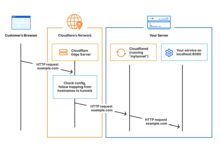
At its core, Cloudflare acts as a reverse proxy between a website’s visitor and its hosting server. When someone visits a site using Cloudflare, their request first goes through Cloudflare’s global network of data centers before reaching the origin server.
- Traffic is routed through over 275 cities in more than 100 countries.
- Data centers are strategically placed to minimize latency and maximize speed.
- Each request is analyzed for threats and optimized for delivery.
This architecture allows Cloudflare to filter out malicious traffic, cache static content closer to users, and reduce the load on the origin server. You can learn more about their network map on the official Cloudflare network page.
Cloudflare’s Core Features and Services
Cloudflare offers a wide array of services that go far beyond basic CDN functionality. From DDoS protection to DNS management, the platform provides essential tools for modern web operations.
Content Delivery Network (CDN)
One of the primary reasons websites adopt Cloudflare is for its robust CDN. By caching static assets like images, CSS, and JavaScript files across its global network, Cloudflare ensures faster load times for users no matter where they are located.
- Reduces latency by serving content from the nearest data center.
- Improves page load speed, which positively impacts SEO rankings.
- Supports HTTP/2 and HTTP/3 (including QUIC) for faster data transfer.
For example, a user in Tokyo accessing a website hosted in New York will receive cached content from Cloudflare’s Tokyo data center instead of waiting for data to travel across the globe. This dramatically improves user experience and reduces bounce rates.
DDoS Protection and Web Application Firewall (WAF)
Distributed Denial of Service (DDoS) attacks remain one of the biggest threats to online services. Cloudflare’s DDoS mitigation system automatically detects and absorbs attack traffic, ensuring legitimate users can still access the site.
- Handles attacks ranging from a few gigabits to over 400 Gbps.
- Uses real-time analytics to differentiate between normal and malicious traffic.
- Offers a customizable Web Application Firewall (WAF) to block common exploits like SQL injection and XSS.
The WAF is particularly powerful because it allows users to create custom rules or use managed rule sets from providers like OWASP. More details on WAF configurations can be found at Cloudflare’s WAF product page.
DNS Management with Cloudflare DNS
Cloudflare doesn’t just protect your site—it powers it from the ground up with one of the fastest and most secure DNS systems available. Their 1.1.1.1 public DNS resolver is known for being both fast and privacy-focused.
- 1.1.1.1 is consistently ranked among the fastest DNS resolvers worldwide.
- Commits to wiping logs within 24 hours and not selling user data.
- Supports DNSSEC to prevent DNS spoofing attacks.
Using Cloudflare DNS can improve browsing speed and enhance security for end-users. It’s especially useful for organizations looking to enforce secure DNS policies across their networks.
Cloudflare’s Security Ecosystem
Security is at the heart of Cloudflare’s mission. The company has built a multi-layered defense system that protects websites from a wide range of cyber threats.
Zero Trust Security with Cloudflare Access
Traditional network security models rely on the idea of a trusted internal network. Cloudflare Access flips this model by implementing a Zero Trust architecture, where every request must be authenticated and authorized—regardless of location.
- Replaces legacy VPNs with secure, identity-based access.
- Integrates with identity providers like Google Workspace, Azure AD, and Okta.
- Allows granular access control based on user, device, and location.
This approach is ideal for remote teams and hybrid work environments. Instead of opening up an entire corporate network, employees can securely access specific applications without exposing the backend infrastructure.
Bot Management and Rate Limiting
Not all traffic is created equal. While some bots are helpful (like search engine crawlers), others are malicious—scraping data, brute-forcing logins, or launching spam attacks. Cloudflare’s Bot Management uses machine learning to identify and mitigate bad bot behavior.
- Distinguishes between human users, good bots, and bad bots.
- Provides detailed analytics on bot activity.
- Allows users to challenge, block, or rate-limit suspicious traffic.
Rate limiting complements bot management by setting thresholds on how many requests a client can make within a given timeframe. This prevents abuse without affecting legitimate users.
SSL/TLS Encryption and Always Use HTTPS
Encryption is non-negotiable in today’s web landscape. Cloudflare provides free SSL/TLS certificates for all domains on its network, ensuring that data transmitted between users and websites remains secure.
- Offers Universal SSL (free) and Advanced Certificate Management (paid).
- Supports modern encryption protocols like TLS 1.3.
- Automatically redirects HTTP traffic to HTTPS with the ‘Always Use HTTPS’ feature.
By enabling HTTPS by default, Cloudflare helps websites meet compliance standards and build trust with visitors. You can explore certificate options at Cloudflare’s SSL overview page.
Performance Optimization Tools
Beyond security, Cloudflare excels in making websites faster and more efficient. Its performance tools are designed to reduce latency, optimize content delivery, and enhance user experience.
Argo Smart Routing
Standard internet routing often takes inefficient paths, leading to higher latency and packet loss. Argo Smart Routing analyzes real-time network conditions to find the fastest path between the user and the origin server.
- Reduces average page load time by up to 30%.
- Lowers bandwidth costs by optimizing data transfer routes.
- Especially effective for dynamic content that can’t be cached.
Argo is a premium feature but delivers significant ROI for high-traffic sites. More information is available at Cloudflare Argo product page.
Image Optimization with Polish and Mirage
Images often account for the largest portion of a webpage’s size. Cloudflare’s Polish and Mirage features automatically optimize images without sacrificing quality.
- Polish recompresses images using modern formats like WebP and AVIF.
- Mirage detects device resolution and connection speed to deliver appropriately sized images.
- Both features require no code changes and work automatically.
These tools are invaluable for mobile users on slow connections, helping maintain fast load times even with rich media content.
Workers: Serverless Computing at the Edge
Cloudflare Workers is a serverless execution environment that allows developers to run JavaScript, WebAssembly, or Python code at the edge—closer to users than traditional cloud servers.
What Are Cloudflare Workers?
Unlike traditional serverless platforms that run in centralized data centers, Workers execute code across Cloudflare’s global network. This means your application logic runs within milliseconds of your users, reducing latency and improving responsiveness.
- Built on the V8 JavaScript engine for fast startup times.
- Supports durable objects for stateful applications.
- Enables real-time personalization, A/B testing, and API routing.
Developers can deploy functions in seconds using Wrangler, Cloudflare’s command-line tool. The Workers documentation is available at developers.cloudflare.com/workers.
Use Cases for Edge Computing
Edge computing opens up new possibilities for real-time applications. Some common use cases include:
- Dynamic content personalization (e.g., showing region-specific offers).
- Real-time authentication and authorization checks.
- API aggregation and transformation.
- Custom bot detection logic.
For instance, an e-commerce site can use Workers to apply geolocation-based pricing or display localized content without hitting the origin server.
Cloudflare for Developers and Enterprises
While Cloudflare is accessible to beginners, it also offers advanced tools tailored for developers and large enterprises.
APIs and Developer Tools
Cloudflare provides a comprehensive REST API that allows full automation of DNS, firewall rules, SSL certificates, and more. This makes it easy to integrate Cloudflare into CI/CD pipelines and DevOps workflows.
- API rate limit: 1,200 requests per minute per zone.
- Supports Terraform for infrastructure-as-code deployments.
- Offers SDKs for JavaScript, Python, Go, and other languages.
Developers can automate tasks like domain provisioning, security rule updates, and performance tuning, reducing manual overhead and increasing consistency.
Cloudflare for SaaS and Enterprise Customers
For large-scale businesses, Cloudflare offers enterprise-grade solutions with enhanced support, SLAs, and customization options.
- Dedicated account managers and 24/7 support.
- Custom WAF rules and advanced DDoS protection.
- Support for multi-cloud and hybrid environments.
Companies like Atlassian, Discord, and Zendesk rely on Cloudflare to protect and accelerate their platforms. Case studies are available on Cloudflare’s customer page.
Free vs. Paid Plans: What You Get
Cloudflare offers a generous free tier, but its paid plans unlock advanced features for growing websites and businesses.
Cloudflare Free Plan Features
The free plan is surprisingly powerful and includes many essential features:
- Basic DDoS protection.
- Shared SSL certificate.
- CDN with global caching.
- DNS management.
- Web Application Firewall (basic rules).
This makes it an excellent choice for personal blogs, small business sites, and startups testing the waters.
Paid Tiers: Pro, Business, and Enterprise
As needs grow, upgrading to a paid plan offers significant advantages:
- Pro Plan ($20/month): Enhanced DDoS protection, custom SSL, faster cache purging.
- Business Plan ($200/month): Advanced WAF rules, Argo Smart Routing, faster support.
- Enterprise Plan (custom pricing): Dedicated infrastructure, custom mitigations, SLAs.
Paid plans also offer better analytics, priority support, and more granular control over security settings.
How to Get Started with Cloudflare
Setting up Cloudflare is straightforward and can be completed in minutes.
Step-by-Step Setup Guide
1. Sign up for a free account at cloudflare.com.
2. Add your website domain.
3. Choose a plan (start with free).
4. Update your domain’s nameservers to point to Cloudflare.
5. Wait for DNS propagation (usually under an hour).
6. Configure settings like SSL, caching, and firewall rules.
Once active, Cloudflare begins protecting and optimizing your site immediately.
Best Practices After Setup
After onboarding, consider these optimizations:
- Enable ‘Always Use HTTPS’ to enforce secure connections.
- Set up Page Rules for custom caching behavior.
- Review security events in the dashboard regularly.
- Use the Speed tab to analyze performance and enable optimizations like Auto Minify.
Regular monitoring ensures you get the most out of Cloudflare’s capabilities.
What is Cloudflare used for?
Cloudflare is used to improve website performance, enhance security, and ensure reliability. It provides services like CDN, DDoS protection, WAF, DNS management, and edge computing through Cloudflare Workers.
Is Cloudflare free to use?
Yes, Cloudflare offers a robust free plan that includes essential features like CDN, basic DDoS protection, shared SSL, and DNS management. Paid plans unlock advanced features for higher traffic or enterprise needs.
How does Cloudflare improve website speed?
Cloudflare improves speed by caching content globally, optimizing delivery routes with Argo Smart Routing, compressing files, and serving modern image formats. It also reduces server load by filtering traffic and blocking bots.
Can Cloudflare stop DDoS attacks?
Yes, Cloudflare can mitigate DDoS attacks of all sizes—from small Layer 7 attacks to massive multi-gigabit floods—by absorbing malicious traffic across its global network and filtering it before it reaches the origin server.
Does Cloudflare offer email protection?
Cloudflare does not directly protect email servers, but it can help secure webmail interfaces and prevent phishing by enabling SSL and WAF protection on email login pages. For full email security, third-party solutions are recommended.
Cloudflare has redefined what’s possible for web infrastructure. From its humble beginnings as a performance tool to its current status as a global leader in security and edge computing, Cloudflare empowers millions of websites to be faster, safer, and more reliable. Whether you’re a blogger, developer, or enterprise, there’s a Cloudflare solution tailored to your needs. By leveraging its powerful features—from CDN and DDoS protection to Workers and Zero Trust—you can future-proof your online presence and deliver a superior experience to your users.
Recommended for you 👇
Further Reading:
